When you create various documents within the system such as Lease Agreements, Notices of Increase, Lease Terminations etc, the system can apply the correct template for your Province.
STEP 1: Navigate to -- ADMINISTRATION → POLICIES → TEMPLATES → DOCUMENT TEMPLATES
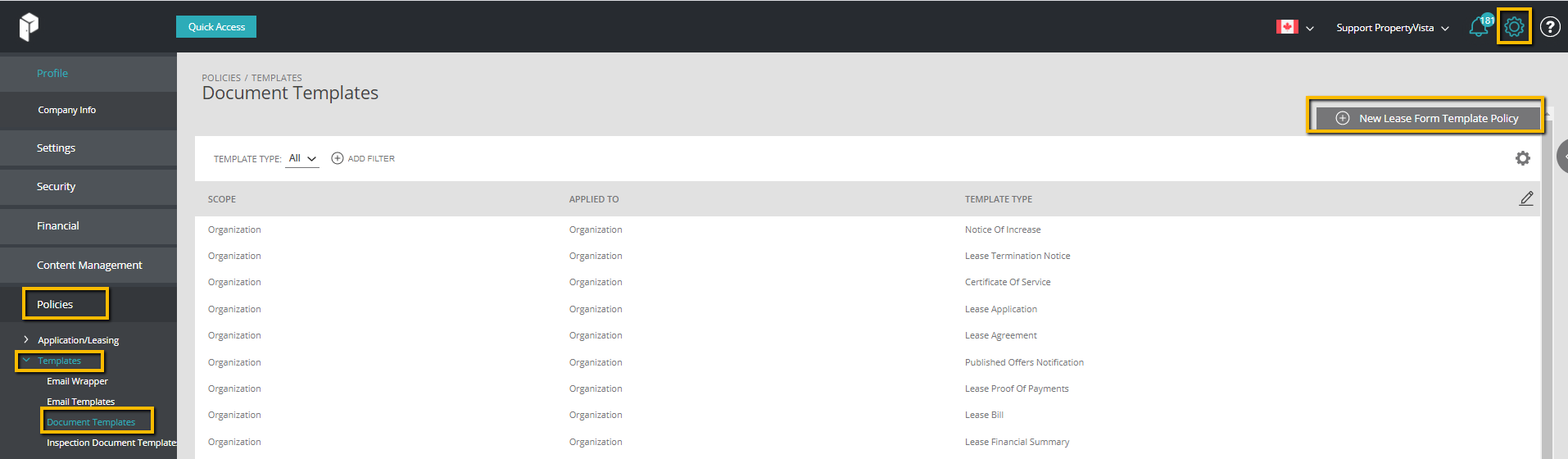
STEP 2: Click New Lease Form Template Policy → Select Scope

| Scope | Select Province Level |
| Applied To | Select your Province |
STEP 3: Click on Template tab → Select the Template Type → Save

| Notice of Increase | Template for Notice of Increase |
| Lease Termination Notice | Template for Notice to End your Tenancy due to Non-Payment of Rent |
| Certificate of Service | Template for Certificate of Service (To file with Landlord & Tenant Board for Non-Payment of Rent) |
| Lease Application | Template for Lease Application |
| Lease Agreement | Template for Lease Agreement |
| Published Offers Notification | Template for Renewal of Lease |
| Lease Proof of Payments | Template for Rent Receipt |
| Lease Bill | Template for Account Summary |
| Lease Financial Summary | Template for Lease Financial Summary |
Once you have set up the templates that you are going to use this task is complete